
Converge integration questions and answers (API, test cards, export scripts)
Answers to common questions about building a Converge payment integration: demo accounts and Elavon test cards, the fields every API request needs, IP and URL whitelisting for Lightbox, Checkout.js and the Hosted Payment Page, common errors, tokens and export scripts.
On this page
How do Converge demo accounts and test cards work?
Is my demo account temporary or permanent?
Check the API user ID. If it is webpage rather than apiuser######, the account is usually temporary: it has to be extended 30 days at a time, and it is reused for other projects afterwards.
I’m asked for a passcode to reset my demo password, but it never arrives
First, check with Cartis which email address is linked to the demo user ID. If it is your address and the passcode still doesn’t arrive, use the resend passcode option.
Why are so many of my demo transactions declining?
The demo environment only accepts Elavon test cards, and it returns pre-programmed responses that change with the cent amount of the sale. The Elavon test host pre-programmed responses (PDF) lists them.
Can I use live card numbers for testing?
No. Live cards are not permitted for testing.
Elavon test cards are accepted as valid in production. Can I stop that?
This matters if you only validate and save cards rather than charging them. When you tokenize with the CCGETTOKEN API call, pass ssl_verify set to Y. Without it, Converge doesn’t validate the card: it accepts whatever it receives and returns a token (ssl_token).
What does every Converge API request need?
Which fields are required for every transaction request?
Payment methods differ, but these 5 fields are required for every transaction request:
| Field | What it is |
|---|---|
ssl_merchant_id |
The Converge account ID assigned by Elavon. This is not the Elavon merchant ID. |
ssl_user_id |
The Converge user ID assigned by Elavon, with API user status so it can send transaction requests. It must be associated with the terminal that processes the requests. |
ssl_pin |
The unique 64-character alphanumeric identifier of the Converge terminal that processes the requests. It must be associated with the ssl_user_id sending them. |
ssl_transaction |
The transaction type, for example ccsale |
ssl_amount |
The sale amount |
Which parameters must every request include during testing?
During testing, include these 5 parameters in every request to Converge. This list differs from the one above: it adds ssl_vendor_id and ssl_partner_id.
| Parameter | What it is |
|---|---|
ssl_merchant_id |
The Converge account ID assigned by Elavon (not the Elavon merchant ID) |
ssl_user_id |
The Converge API user ID, associated with the terminal that processes the requests |
ssl_pin |
The 64-character Converge terminal identifier, associated with the ssl_user_id |
ssl_vendor_id |
Assigned by your solution engineer |
ssl_partner_id |
Assigned by your solution engineer |
What are the endpoints for demo and production accounts?
See the full list and explanation of endpoints. Production endpoints are the demo URLs with “demo” removed.
Which transaction types does Converge support?
Credit card, debit card, cash, EBT (for example food stamps), gift card, loyalty card, card manager, end of day, batch import, account administration and electronic check.
Is anything required for ecommerce transactions?
Yes, the invoice number. It is passed to the card issuer and shown on the cardholder’s monthly statement so they can recognise the transaction. You can also pass a merchant transaction ID: it stays with the transaction throughout processing and you can use it as a unique identifier in your payment reporting.
Can I add optional fields to identify a transaction?
Yes. You can include address, zip code and similar fields, plus other optional fields such as a description.
What happens if the card only covers part of the amount?
It depends on partial approval. If partial approval is enabled, the response comes back as “partial approval” with an extra “balance due” field. If it isn’t enabled, the transaction is rejected. Partial approval is off by default.
Why did my token transaction fail?
For example, this request fails:
ssl_transaction_type=ccsale&
ssl_amount=15.34
ssl_token=1234567
A token only works if the card was saved to the card manager (token vault), and a card is only saved there if the first transaction includes ssl_add_token=Y. If the first transaction didn’t include it, there is no saved card for the token to use, so the request fails.
Does the XML API have to be form-encoded, or can I send XML as-is?
The XML API expects form-encoded data. Set the Content-Type to application/x-www-form-urlencoded; with that header set, you should be able to send the XML data as it is.
What’s the difference between ssl_payment_number and ssl_payment_count?
For installment transactions, ssl_payment_count is the total number of installments due and ssl_payment_number is where this payment falls in the sequence. Payment number must be less than or equal to payment count: payment number 17 with payment count 20 is the 17th payment of 20.
Our CVV field only takes 3 digits. Do Amex cards need a change on our side?
Converge doesn’t show a character limit on the CVV field, so the limit may be in your own solution.
Is there ASP.NET (C#) sample code?
Elavon doesn’t provide ASP.NET (C#) samples for Converge API integrations such as Lightbox; the sample in the developer portal is PHP. The HTML/PHP sample shows the basic elements and formatting of the payload you submit to Elavon/Converge, so use it as the basis for your own C# code.
How do I whitelist my server for Lightbox, Checkout.js and the Hosted Payment Page?
Checkout.js won’t generate a session token: “error code = 403”
The full message is The application has encountered an error, error code = 403. To request a session token (ssl_txn_auth_token) for Checkout.js, Lightbox or the Hosted Payment Page, the IP address of the server you post transactions from has to be whitelisted. For Lightbox, the website’s URL also has to be in the HTTPS referrers list, or the payment modal won’t load on your site.
A 403 means the request has a problem: either the IP or URL isn’t whitelisted, or what’s whitelisted is wrong. In a demo environment the whitelisted IP should be your development server’s; for boarded merchants in production, it should be the production servers and URLs.
To find the IP to whitelist, send a GET request from your server to https://www.convergepay.com/hosted-payments/myip, then contact Cartis and ask us to add that IP to the IP Filter on your account.
PHP GET Example:
<?php
    $ch = curl_init("https://www.convergepay.com/hosted-payments/myip");
    curl_setopt($ch, CURLOPT_RETURNTRANSFER, true);
    curl_setopt($ch, CURLOPT_HEADER, 0);
    $data = curl_exec($ch);
    echo $data;
    exit;
?>
Does the referrer URL need to be the full URL, or is the domain enough?
Give the full URL. In our testing, the domain alone may only work when there’s no subdomain: merchantname.mywebsite.com would not work with just mywebsite.com, but mywebsite.com/merchantname would.
Can I whitelist a URL with a wildcard?
No. URLs such as *.appname.com/api/elavon/exportscript can’t be added with a wildcard.
What’s the recommended way to process sales and refunds?
A common practice is to tokenize the card (ssl_token) up front through Lightbox, then reference that token to process the sale through the XML API in a server-to-server call. For refunds, use linked refunds so the money goes back to the card used for the original payment.
What do common Converge errors mean?
Error 4025: credentials supplied in the authorization request are invalid
Usually one of the API credentials (ssl_merchant_id, ssl_user_id, ssl_pin) is wrong. Check you’re using the right ones; they are case sensitive, and ssl_merchant_id is the account ID, not the merchant ID. A setting enabled by mistake, such as an XML whitelist, can also cause it.
What happens after too many invalid PIN attempts?
After 5 invalid attempts, the source IP address goes onto the fraud IP list. Every account that sends API requests from that IP then fails, because they share the same source IP. In one case we saw, a whitelisted IP was entered incorrectly on one merchant account; its invalid attempts got the shared source IP blacklisted, and the other merchant accounts on that IP failed too.
To clear it, Tier 2 software support has to add the source IP to the global whitelist so it bypasses the fraud API attempts error.
“The field Address1 (ssl_avs_address) required but not supplied in the authorization request”
This happens when AVS fields are set to required and the request doesn’t include them. Deselecting the AVS fields in the payment field settings stops the error, but read the note below first.
“Method not allowed” and “Unfortunately our payment gateway is down right now”
The full message is Unfortunately our payment gateway is down right now. Please try again in a few minutes, or contact support for assistance. Converge no longer supports the GET method on process.do and processXML.do (the final shutdown date was August 1, 2022). This error means the request was sent with GET. GET requests carry all the data in the URL, which can expose secure data, so change your API code to stop using GET.
The Magento plugin returns a blank (null) response with a 400 error
The Magento plugin was built against Converge’s legacy (classic) API, so the GateWay Url must be set to https://api.convergepay.com/VirtualMerchant/process.do.

How do export scripts and settlement data work?
What data do export scripts return?
The batch summary: the number and amounts of the payments that settled.
Does the export script send a response for settlement only, or for every payment?
In the Converge user interface (UI), each terminal’s settings let you list one URL for approval, decline and error transactions. Use the same URL for all three or a different one for each, depending on how you want to receive responses. A flag lets you send only the settlement response, without a response for each payment request.
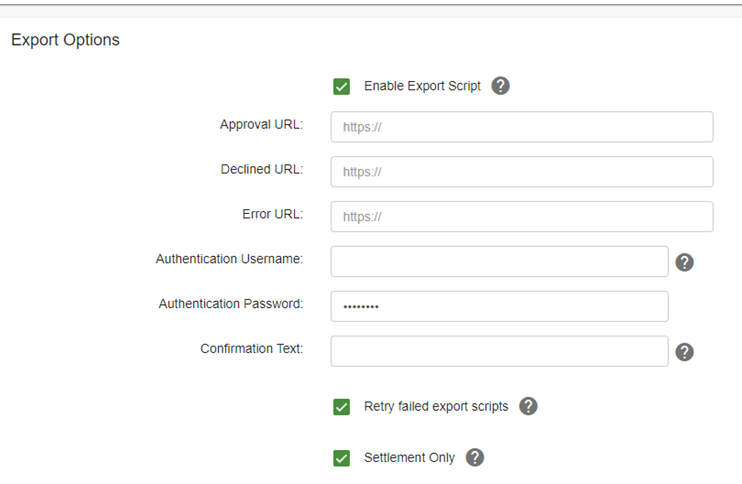
Is “Enable Export Script” available in demo accounts? We aren’t getting posts.
Yes, it’s available in the DEMO environment. If posts aren’t arriving, it may be a proxy issue: the URL may need to be whitelisted on the back end (added to the proxy server).
Which IP addresses do I whitelist to receive responses on my server?
| Export script IP range | CIDR |
|---|---|
| 62.17.112.80 to 62.17.112.95 | 62.17.112.80 /28 |
| 62.134.193.208 to 62.134.193.223 | 62.134.193.208 /28 |
| 65.201.175.80 to 65.201.175.95 | 65.201.175.80 /28 |
| 204.137.47.32 to 204.137.47.47 | 204.137.47.32 /28 |
Some partners can’t receive responses until their export script URL is added to the Elavon proxy server. If that’s you, contact Cartis support to request it.
“javax.net.ssl.SSLHandshakeException … PKIX path building failed”
The full error is javax.net.ssl.SSLHandshakeException: sun.security.validator.ValidatorException: PKIX path building failed: sun.security.provider.certpath.SunCertPathBuilderException: unable to find valid certification path to requested target. All three URL values (approval, decline, error) must be added to receive settlement export scripts.
What time zone is the settlement time in?
The settlement date and time in export scripts is Eastern, whatever time zone the terminal is set up in. The authorization date and time of each transaction uses the terminal’s time zone.
Which transactions are included at settlement?
The terminal settles payments from the previous 24 hours. For example, a terminal set to auto settle at 12AM settles payments made between 12:00:00AM and 11:59:59 PM the previous day.
What is the last part of the Settled_Date format, and does it follow daylight saving time?
The last part is milliseconds. The time is Eastern and follows daylight saving time rules.
After a settlement response, how do I see which transactions were in the batch?
The export script settlement response gives the batch number and the settlement date and time. Send a transaction query (txnquery) for that 24-hour period to get the day’s settled transactions. The transaction query can now include the batch ID.
Is there another way to get settlement information for our downstream merchants?
Send a transaction query (TXNQUERY) for the previous day, covering the period the transactions were processed in before settlement, and keep only results with ssl_trans_status of STL. Those should match the payments settled that day. TXNQUERY now returns the batch ID, GBOK and token value, so you can also filter by the GBOK number (batch ID).
What time zone does a transaction query use?
The terminal’s (your merchant’s) time zone.
What do the parts of a GBOK number mean?
A GBOK is made up as GBOK BBBMMDDHHMM:
| Part | Meaning |
|---|---|
| GB | good batch, settlement received OK |
| BBB | batch number 001 through 999 |
| MMDD | month and day of settlement |
| HHMM | time of settlement |
Common questions
What card data can’t my software store?
Don’t store full card numbers, expiration dates, social security numbers, track data or CVV2 data.
Can I build an e-gift card program on Converge?
There’s no e-gift program today, but you can build a workaround from scratch. Your software keeps its own database of physical gift cards the merchant orders; the cards don’t have to be handed out, because the numbers can be passed through the API. New card numbers go into an unactivated pool. When a customer buys a gift card online, your database picks a number, activates it through the Converge API and moves it to that customer’s profile. When the customer pays with it later, your shopping cart sends the number and balance through the API for redemption and updates the balance in the profile.
Who can help with my Converge integration?
Contact Cartis Payments at 1-888-712-0770 or support@cartispayments.com for IP whitelisting, proxy requests and account settings.
Updated November 2, 2026
Still stuck? Talk to a person.
Our team answers the phone.
Building payments into your software? See Cartis payment integration