
Converge API integration methods: Hosted Payment Page, Lightbox, Checkout.js and XML API
The Converge API gives you four ways to connect a website or POS application to the Converge payment gateway: the Hosted Payment Page (HPP), Lightbox, Checkout.js and the XML API, all using Converge for the payment processing. Pick HPP or Lightbox for the easiest setup and the lightest PCI requirements. Pick Checkout.js or the XML API when you need more control.
On this page

Through the Converge API, your website or software can process credit card, debit card, electronic check, gift card, recurring and installment transactions.
Which Converge integration method should I use?
The PCI SAQ type is the PCI self-assessment questionnaire you complete for that method.
| Hosted Payment Page | Lightbox | Checkout.js | XML API | |
|---|---|---|---|---|
| Ease of integration | Easy | Easy | Medium | Hard |
| Market segment | eCommerce | eCommerce | eCommerce | Retail, Service, MOTO, eCommerce |
| Card present / card not present | CNP | CNP | CNP | CP, CNP |
| PCI SAQ type | SAQ A | SAQ A | SAQ A- EP | SAQ D |
| Customization | Minimal | Minimal | Extensive | Extensive |
What is the Converge Hosted Payment Page (HPP)?
HPP sends your customer from your site to a checkout page hosted by Converge, so sensitive information is handled by Converge. Your server first requests a session token, then uses it to open the payment page. In the settings you can add your logo and change the banner and button colours to match your website.

Elavon’s guide: Hosted Payment Page overview.
What is Converge Lightbox?
Lightbox opens the Converge payment form as an overlay (an iframe) on top of your own page, so customers stay on your site. It works in two steps: your server asks Converge for a session token (ssl_txn_auth_token), then the browser sends the card details and that token to Converge through Elavon’s Lightbox JavaScript library. Your merchant credentials stay off your website.
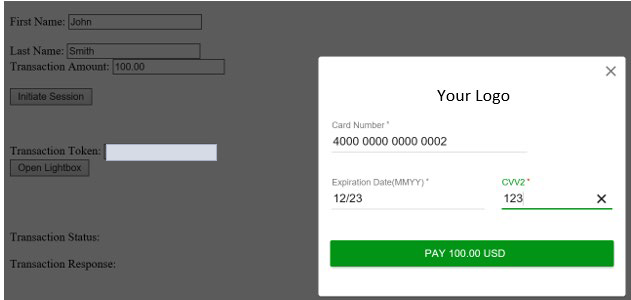
Elavon’s guide: Lightbox payment modal overview.
What is Converge Checkout.js?
Checkout.js is for merchants who want to design the whole payment page themselves, on their own URL with no redirect. You add Converge’s JavaScript library to your page; it collects the card details in the customer’s browser and sends them straight to Converge. The token flow is the same as HPP.
Elavon’s guide: Checkout.js overview.
What is the Converge XML API?
The XML API gives you complete control of checkout: your own servers collect the payment data and send it to Converge. Because your systems handle card data, you’ll need to provide an Attestation of Compliance.
Elavon’s guide: XML API overview.
Common questions
What is the difference between the Converge Hosted Payment Page and Lightbox?
Both keep card data on Converge and fall under SAQ A. HPP redirects the customer to a Converge-hosted page; Lightbox opens the payment form as an overlay so the customer stays on your site.
Which Converge method has the lightest PCI requirements?
HPP and Lightbox (SAQ A). Checkout.js is SAQ A-EP and the XML API is SAQ D.
Which method supports card-present payments?
Of these four, only the XML API covers card-present (CP) as well as card-not-present payments.
Updated November 2, 2026
Still stuck? Talk to a person.
Our team answers the phone.
Building payments into your software? See Cartis payment integration