
How to pair a Link 2500 card reader with Converge Mobile (Bluetooth)
To pair an Ingenico Link 2500 card reader with your phone or tablet, set the reader’s communication type to Bluetooth, pair it from its Bluetooth Parameters menu, then turn on the card reader in Converge Mobile under settings.
On this page
Before you start
- Your Converge account needs to be set up with a retail terminal ID.
- In Canada, we first need to associate the card reader with the retail terminal in Converge, and then with the user who will use that card reader. Contact us to have this done before you pair.
How do I set the Link 2500 to Bluetooth?
The Link 2500 pairs with your phone or tablet over Bluetooth, so first check that its communication type is set correctly. On the Link 2500:
- Press 0001
- Select 1- Communication type
- Select 4 -Bluetooth (*depending on your device the option may be Bluetooth_PCL)
- Press the red button
- Select 1 - Yes to save an reboot.

How do I pair the Link 2500 with my phone or tablet?
Make sure bluetooth is turned on and enabled on your smartphone or tablet
On the Link 2500:
- Press 0001
- Select 3 - Bluetooth Paramters
- Select 2 - Phone pairing
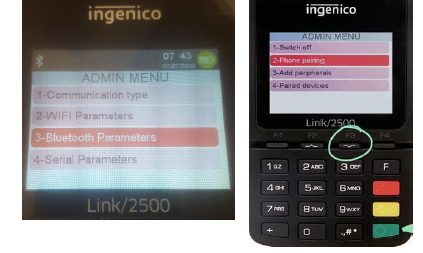
The Link 2500 will display the device name and that it is now visible.
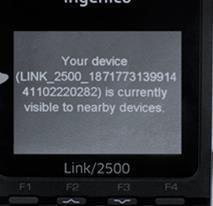
On your smartphone or tablet:
- Go to bluetooth menu and search for devices. You should see the Link 2500 listed as a device you can add. Select it to pair and confirm the passcode on both the card reader and the phone / tablet.
The Link 2500 shows the passkey and asks you to press OK to validate it.

How do I connect the card reader in Converge Mobile?
In the Converge Mobile app:
- Click on settings
- Select card reader
- Make sure Bluetooth is toggled on and card iCMP or Link/2500 is toggled on – the device name should populate under that. If it does not try to toggle off and on.

You’re now ready to try a sale in your Converge Mobile App.
Common questions
I don’t see Bluetooth in the communication type menu. What do I pick?
Depending on your device, the option may be called Bluetooth_PCL.
The reader’s name doesn’t appear in Converge Mobile. What should I do?
In the app’s card reader settings, try toggling the card iCMP or Link/2500 option off and on.
Do I need anything set up on my account first?
Yes. Your Converge account needs a retail terminal ID, and in Canada we need to associate the reader with the terminal and user. Call us at 1-888-712-0770 or email support@cartispayments.com.
Updated November 2, 2026
Still stuck? Talk to a person.
Our team answers the phone.
Taking payments with Converge? See Converge from Cartis