
How to log in to My Payments Insider (MPI) with single sign-on
To log in to My Payments Insider (MPI) with single sign-on, choose Sign in with single sign-on credentials on the Payments Insider sign-in page, enter your user name and password, then enter the one-time password emailed to you.
On this page
How do I log in to MPI with single sign-on?
- On the Payments Insider sign-in page, click Sign in with single sign-on credentials.

- In the Single sign-on window, enter your User Name and Password, then click Sign In.
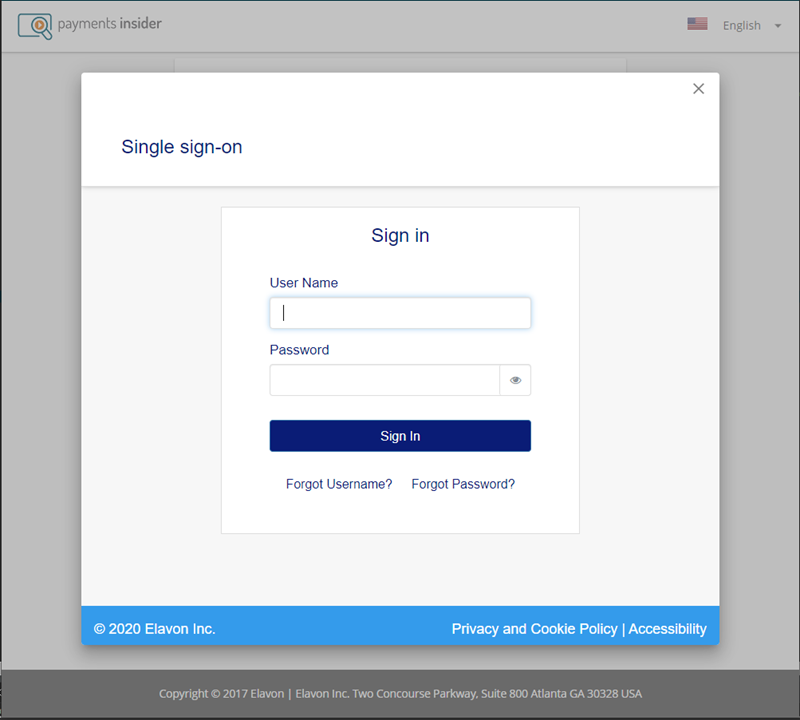
- Under Choose a OTP Method, choose Email, then click Next.

- The window asks for your One Time Password.

- Open the email titled Your One Time Password and copy the password.
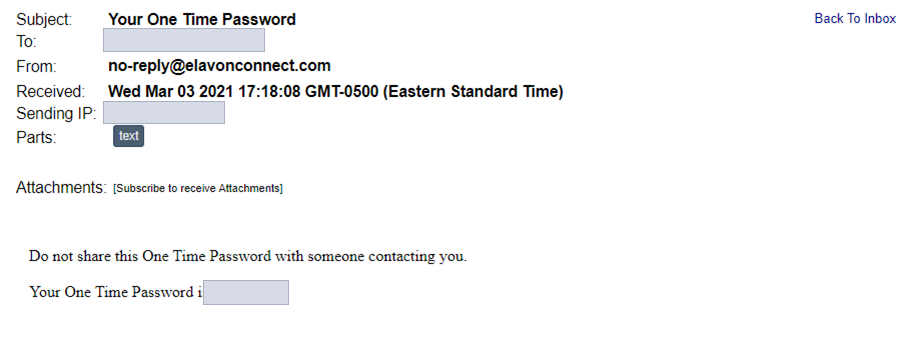
- Enter the one-time password and click Sign In.

You will see a Loading screen, then the Payments Insider home page, as in the screenshots below.

Common questions
Where is the Payments Insider sign-in page?
My Payments Insider is at https://www.mypaymentsinsider.com/.
I don’t have a Payments Insider login yet. What do I do?
Register first: go to https://www.mypaymentsinsider.com/ and click Register. You can self-register 48 hours after your Merchant ID is assigned.
Updated November 2, 2026
Still stuck? Talk to a person.
Our team answers the phone.
Looking at your processing costs? See the Cartis payment gateway
More in My Payments Insider (MPI)
- How to add a second location (MID) in Payments Insider (MPI)
- How to add or delete users in Payments Insider (MPI)
- How to change your bank account or business details in Payments Insider (MPI)
- How to manage and respond to chargebacks in Payments Insider (MPI)
- How to register and sign in to My Payments Insider (MPI)
- How to run, filter and export reports in My Payments Insider (MPI)