
How to manage and respond to chargebacks in Payments Insider (MPI)
You can see your Elavon chargebacks in Payments Insider (MPI) under Reports > Chargebacks, and respond to one by fax, by email or directly inside Payments Insider.
On this page
A chargeback is when a cardholder disputes a charge with their card issuer and the payment is reversed.
How do I run a chargeback report?
The Chargeback Summary Report shows chargeback activity for the previous 24 months.
- From the left side menu, under reports, select chargebacks.
- Narrow your search with the drop-down filters.
- Remember to apply filter and press on show results.
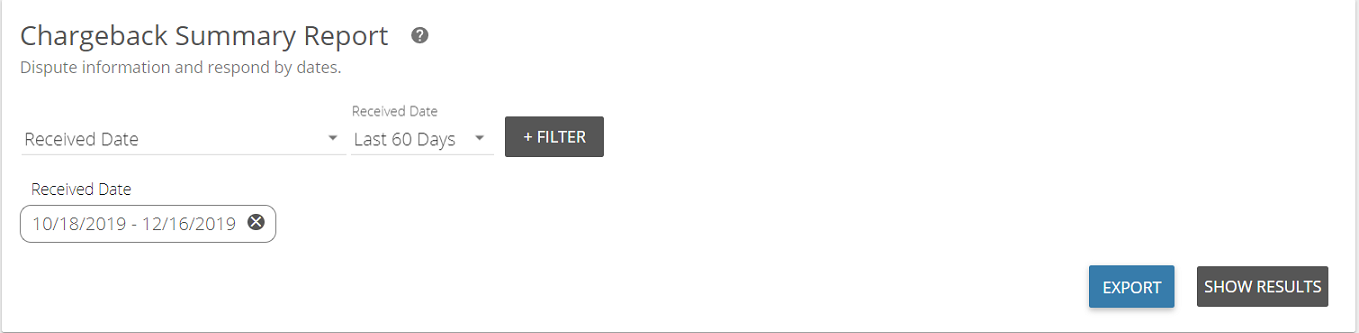
You can export or download the report. If the spreadsheet doesn’t load right away, a notification icon  appears at the top right of your page once it’s ready to download.
How do I respond to a chargeback?
Chargeback notices are sent by secure email to the primary business email on file. Each notice shows the respond-by date and lets you accept or fight the chargeback.
- If you agree with the chargeback, you don’t need to do anything.
- If you want to dispute it, check that option on the notice and submit it together with evidence, such as a signed receipt or invoice.
You can send your response one of three ways:
| Method | Where to send it |
|---|---|
| Fax | 877-888-2034 |
| DisputeResolution@elavon.com | |
| Payments Insider | Respond inside Payments Insider (steps below) |
How do I respond inside Payments Insider?
- Generate the chargeback summary report, then select the chargeback you want to respond to.

- Click on it. The transaction detail screen opens with the transaction date, amount, terminal ID, card type and more.
- Scroll to the bottom of the transaction detail page. If you can respond from within Payments Insider, you’ll find a copy of the notification, any related materials (for example a cardholder questionnaire), and the option to remedy (respond) and upload supporting evidence.

Updated November 2, 2026
Still stuck? Talk to a person.
Our team answers the phone.
Looking at your processing costs? See the Cartis payment gateway
More in My Payments Insider (MPI)
- How to add a second location (MID) in Payments Insider (MPI)
- How to add or delete users in Payments Insider (MPI)
- How to change your bank account or business details in Payments Insider (MPI)
- How to log in to My Payments Insider (MPI) with single sign-on
- How to register and sign in to My Payments Insider (MPI)
- How to run, filter and export reports in My Payments Insider (MPI)