
How to set up SMS / text notifications for funding in My Payments Insider (MPI)
To get SMS / text notifications for Elavon funding in My Payments Insider (MPI), open Account, then Personal, then Notifications, check the merchant account under Subscription, update your phone number and press update. Then opt in on your phone within 24 hours.
You can set your notification preference to receive SMS / Text notifications for Elavon funding activity on your merchant account.
How do I turn on text notifications for funding?
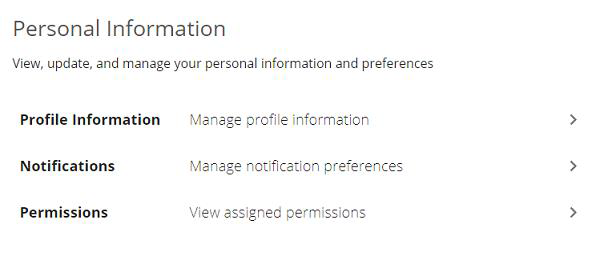
- From the left side menu, Under Account select Personal
- Select Notifications
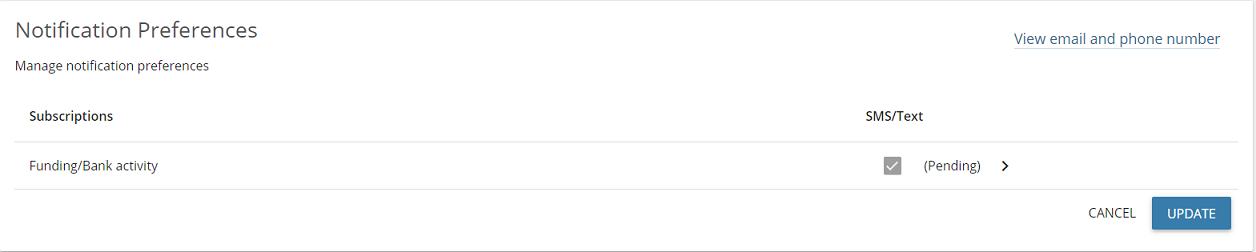
- If there are multiple accounts, a drop-down arrow next to the item under Subscription will display eligible merchant IDs. A check mark next to that merchant account indicates the account is currently set up to receive text message alerts.
- Click on the view email and phone number to make changes to the email / phone number.
- Once complete press update.
If you need help setting up notifications, contact Cartis Payments at 1-888-712-0770 or support@cartispayments.com.
Updated November 2, 2026
Still stuck? Talk to a person.
Our team answers the phone.
Looking at your processing costs? See the Cartis payment gateway
More in My Payments Insider (MPI)
- How to add a second location (MID) in Payments Insider (MPI)
- How to add or delete users in Payments Insider (MPI)
- How to change your bank account or business details in Payments Insider (MPI)
- How to log in to My Payments Insider (MPI) with single sign-on
- How to manage and respond to chargebacks in Payments Insider (MPI)
- How to register and sign in to My Payments Insider (MPI)